Showing posts with label ECOS. Show all posts

February 26, 2012

An ECOS Update, A Camera Car, and my Class 37 Lives!

Reports of the death of my My British Rail Class 37 were apparently exaggerated.  I looked up my repair options yesterday and was preparing to ship this engine back to England but decided to tinker with it one last time.  I found the power connection between the PC board and the chassis (it's built North American style, where the weight is split down the center and carries the current!) and poked at it and voila!  All better!


I'm very pleased to have this back in operation again.  Also, if you happen to find yourself in York, I can thoroughly recommend the Monk Bar Model Shop, as it made me sorely miss the great hobby shops I grew up with.  The staff really know their stuff.


Camera Car A few weeks ago I bought a WiFi camera and USB receiver on eBay, like this:.  
I cannot recommend it, not yet at least.  The software it comes with is beyond poor, but it does work. I'll be posting a video made with this toy soon and you can judge for yourself.

On my first attempt to use it I found it the camera made the car I butchered for it top heavy- it tipped in corners, even at very low speed.  On straights it also wobbled something terrible.  Granted, my effort (seen below) was rather crude, but I did learn from the experience.

The battery was to help balance the weight on the car.  Didn't work well.

The key seemed to be stability and size.  Out of the box it's a little big for n scale so I knew I'd need to take it apart and loose the housing.  I bought a North American well style cargo container car to use as a new platform, the cheapest model I could find of one of these:


The beauty of a well car is that it has storage space very low to ground, and so a very low center of gravity.  I ripped off all of the details, which were few, and using model ship strip wood built a wooden platform in the bottom and then added a layer of lead fishing weights and solder as balast, and then capped that with another layer of wood.   I then removed the camera from it's case, mounted the guts to the well and the lens to front of the car and I had a super stable camera platform.  It''s not pretty, but it does the job.


What's the video quality like? Well, I'll edit something nice together sooner or later.  The raw feed is pretty iffy and the included software is just crap.

Live from the tracks!
In tunnels the WiFi signal drops out so I plan to look at extending the antenna.  I think I can make a long one and have it spread over several cars.  More on this in future posts.

ECOS 50200 v3.4.3

A few weeks ago ESU released a minor update for the ECOS.  It's mainly bug fixes, but there are a few tweaks I really like.  First, they have added a save option in one of the config screens, which means you no longer have to hold down the stop button to power cycle the unit for force a store.  Also, when connected with a browser you can reset the ECOS remotely, so if you are uploading train icons you can cycle the ECOS without having to power down, which really speeds things up.   The only other big new add for me was the addition of a track crossing icon for the mapping mode.

And with the above goodness comes the not so good.  Updating will also wipe out your user defined locomotive images, all your switches, and your layout map.  ESU gives you a convenient way to back these up via HTTP but if you are really excited about new firmware like say, me, you may forget to do this.  Happily I'm now largely controlling everything from the PC and Train Controller anyhow, so it was just a matter of restoring my icons.

ESU hosts a large library of icons for the ECOS, but they rarely seem to have just what I want.  I'm a bit fussy I guess, so I want all mine to be in about the same scale, all facing the same way, and all with a background matching the system color.  For these reasons I've spent many hours photoshopping exactly the icons I want.  Perhaps they are of some value to a few of you, I'll put them at the end of this post.


June 7, 2011

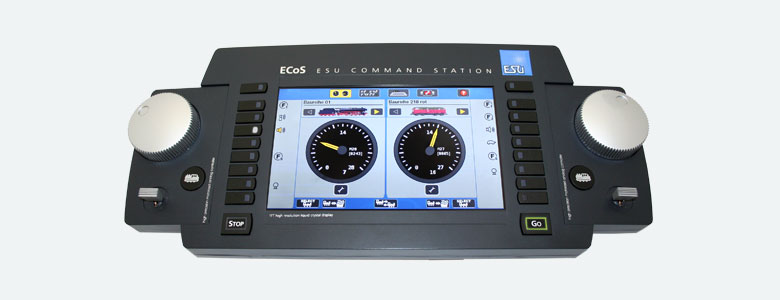
Review: ECOS 50200

It slices! It dieces! But wait- there's more!


The ECOS is IMO far and away the most attractive controller on the market. See Jerry Quinn's excellent comments on the sorry state of dcc aesthetics here. The ECOS does everything I'm aware one could want such a unit it do, and it does it well insofar as I've observed. The UI is good, the touchscreen is good, the color display looks good and overall it's very easy to work with.

Programming is really easy! Previously I used a Trix mobile station and in a word it is shit. Perhaps that set the bar low, but I love my ECOS. I have my layout mapped in it, I have all my engines with custom graphics (All the default icons are European, but you can upload your own). If you choose to use this with the radio control throttle you will be limited to their default iconic euro symbols however. (That is, you only get to see your fancy custom bitmaps on the touch screen).

The ECOS exists on my network! All computers in my house can see it. Software on my PCs can access it and manipulate the trains and switches. It can produce output via it's html interface, like logs and rosters. It's really easy to update with new versions of it's software. This is also how you upload your own locomotive images. I’ve made custom art for all my engines not already included, easy to photoshop, and looks great.

My ipad and iphone can see it too, and using iCab I can run my trains from both. The software updates seem to come every few months and have added new features each time. I'd liken it to getting an update for your iphone's iOS. Sometimes it's mainly bugs, sometimes it adds something cool. The key thing is that the software is an ongoing project, buying an ECOS is buying into a platform that's being actively developed, it's not just an appliance like other controllers.

I’ve tried out touchcab for the iphone/ipad and it works as advertised, though it seems more a novelty then a controller replacement.

The ESU website annoyingly requires your serial number before you can download firmware updates, and it’s verified manually, so I had to wait a few days to get it. A onetime issue, but an annoyance.

Complaints: The only real improvement I’d like to see is an upgrade to the quality of the plastics used for the housing. I want it to feel like it was made by Apple and not Acer. Also, it has no power button. You can shutdown the software but to power it down it must be unplugged. Odd.

Also, I have found that Fleishmann 6 pin NEM 651 decoders do not run smoothly with Railcom feedback enabled on the ECOS. I'm not sure who owns that bug, but it did cause me some annoyance.

Using the track mapping feature I spent about 45 minutes to map out my layout thus far. I can now tap the switches and uncouplers on the map to throw them, and the graphics update. Sweet. As a means of operating those however, I think the amount of attention the map requires makes it a little impractical, though, the little switch icons are kinda small. Still, the really important thing is that the ECOS can control it, which means my PC can, and my phone can, and with the sensors I plan to install the whole thing will run itself to a degree one day.

So there you go. Overall, a really nice box.

Thumbnails below, here's the day it arrived:


Scale Speed

I have an ECOS 50200 controller, which I plan to post about.  One of the nifty features of it is the ability to set a speed the displayed speed for each locomotive.  That is, you give it a speed value for each engine that represents what dialing in 100% speed corresponds to.  I'm a professional geek, and so I couldn't resist.

I looked up the published top speeds of each of my locomotives (thanks wiki) and made a spreadsheet.  Then using Anyrail (which I totally recommend BTW) I created a simple loop of kato unitrack, measured it in software as being 3.51m long, and them built it on a spare table.  3.51m scales up to 561 real meters, so that seemed big enough to get a reasonable sample.  Because it's unitrack I know exactly how long a loop it is, there's no fuzzy numbers, easy peasy.   So, my next step was to work out how long a lap should take each engine when running at their real max speed, in scale.  I worked that out in my excel sheet and came up with this table:


CE 6/8 Green
65
11.3
31.1
BR Class 48
70
12.2
28.9
SBB AE 8/14
100
17.4
20.2
SBB AM 4/4
140
24.3
14.4
CE 6/8 Brown
65
11.3
31.1
SBB AE 6/6 Green
125
21.7
16.2
DB V60
60
10.4
33.7
SBB RE 482 cargo
140
24.3
14.4
S 3/6 Green
120
20.8
16.8
SBB AE 4/4
140
24.3
14.4
CN SD40-2
105
18.2
19.3
DB V300
120
20.8
16.8
SBB AE 6/6 Red
125
21.7
16.2


So now all that was left to do was run each engine about a lap, time it, and adjust the CVs for max speed till they were as close as possible to the number in the right hand column.   The Selectrix locomotives, having fewer speed steps, were hard to get dialed in right, but other than that it was trouble free and rather rewarding.

So what's the end result?  On my ECOS unit I can now take any locomotive, set it for 60 KMH, and get that actual speed, in scale.  It's not all exact, but it's close, which is all I care about.  No longer are my crocodiles passing the AM 4/4, and so I am happy.


Also of note, the one Kato engine I have was doing over 450 scale KMH with factory settings on a MRC decoder.  Yikes.